Wednesday, April 17, 2019

Samsung’s Galaxy Folds Are Breaking After Only a Few Days

Samsung’s much-anticipated Galaxy Fold phone/tablet hybrid is almost here. But with the April 26 release date inching closer, multiple reviewers are already having problems with the flexible OLED screen after a few days of use.

Dieter Bohn, writing for The Verge, discovered a piece of debris had worked its way under the screen somehow after just a few days, before the screen broke entirely:

He’s not the only one, either. Here’s a video from Steve Kovach at CNBC:

In other cases, some reviewers peeled off a plastic cover that appeared to be a screen protector, but is actually a “polymer layer” that is supposed to stay on the screen. When peeled off, the screen becomes unusable, per Mark Gurman of Bloomberg:

YouTuber Marques “MKBHD” Brownlee did the same thing with the polymer layer on his phone:

If even the most tech-savvy reviewers think it’s a removable screen protector, it’s likely that most consumers will run into this same scenario as well. Samsung boasts about the device’s multi-layered design on its website, but clearly that isn’t working out for them as well as they’d hoped.

Samsung has yet to offer an official comment on the issue, but we’ll update this post when they do.

It’s unclear how many people were affected, since the most well-known examples are coming from tech reviewers with lots of reach on social media. It’s possible this is a bigger design flaw with the phone, and we’re anxious to examine the device more closely once we get our unit in the office.

The Most Common Ways Manufacturers Prevent You From Repairing Your Devices

Unlike the Highlander, your phone and laptop are not immortal. One day, something will break—you’ll crack the screen, or your battery will become so old it can’t hold a charge. Device manufacturers want you to buy a new device when that happens, instead of repairing the almost-perfectly-usable device you already have—and it shows in the design.

As the years have worn on, manufacturers have made more and more choices that prevent you from repairing your devices—some may be mere cost-cutting measures, while others are more egregious, locking you out for the sole purpose of preventing you from repairing your own device. Here are some of the most common examples.

Slapping “Warranty Void If Removed” Stickers on Your Gadget

Don’t be scared by these stickers—they’re illegal.

When you crack open the back panel on your device—or perhaps even before—you’ll often find a sticker that claims your warranty will be void if you break the seal. But “that’s illegal under the Magnuson-Moss Warranty Act of 1975,” says Jeff Suovanen, teardown engineer at iFixit. A manufacturer can’t deny a warranty repair for, say, your screen just because you replaced your own battery. “There are a lot of things manufacturers do to sort of passive-aggressively discourage you from fixing your stuff, but the warranty-void-if-removed stickers are much more overt.” This law has gone unenforced for too long, but thankfully the FTC has begun cracking down on this misleading practice—though many manufacturers are still doing it.

Using Rare or Proprietary Screws

Most people don’t have a tri-wing screwdriver lying around in their garage.

Everyone has a screwdriver at home, and some tech-savvy individuals may even have a set of torx bits in their toolbox. But manufacturers are increasingly using even harder-to-find screws that prevent you from getting inside the chassis.

“The easiest one to pick on is Apple, because they picked a screw design so obscure we’d never even heard of it,” says Suovanen. “And we know it wasn’t for engineering reasons, because the iPhone got along fine with ordinary Phillips screws—until all of a sudden the iPhone 4 switched to pentalobe screws. But only on the outside—none of the interior screws were changed. Since no one had a pentalobe driver, the clear intent was to tamper-proof your iPhone.”

Apple isn’t the only manufacturer to do this, of course—Nintendo was doing it all the way back in the 80s with a special security bit on NES cartridges and, later, on the Super Nintendo. These kinds of lock-out moves have only proliferated. These days, Nintendo uses rare tri-point screws on their hardware, Amazon uses tri-wing screws on the Fire TV, and Sony uses Torx security screws in the PlayStation 4.

“Torx security screws are some of the most frustrating ones, because a lot of people have torx drivers in their toolbox,” says Suovanen. “But manufacturers take that extra little step and use a torx security bit—which again, adds nothing engineering-wise to the device. It’s just an attempt to keep you out.” Some manufacturers don’t go quite this far, but will still hide screws under rubber pads or other panels.

Gluing Instead of Using Screws

Microsoft’s Surface Pro 3 is one of many devices held together with glue rather than screws.

In the age of sleek, curved devices with no obvious seams, many manufacturers have turned to glue instead of screws to hold things together. “There are legitimate reasons to use glue—like waterproofing,” says Suovanen. “But there is almost always a better way, like using screws and gaskets. Glue is very difficult to work with if you’re trying to repair something. It’s difficult to separate without breaking things, and it’s a pain to replace.” And when you use glue to hide those seams, it makes the device appear impossible to open, disincentivizing users to repair their device, instead of grabbing the ol’ Phillips head and taking a look inside.

Soldering Major Components Together to Make Upgrades and Repairs Impossible

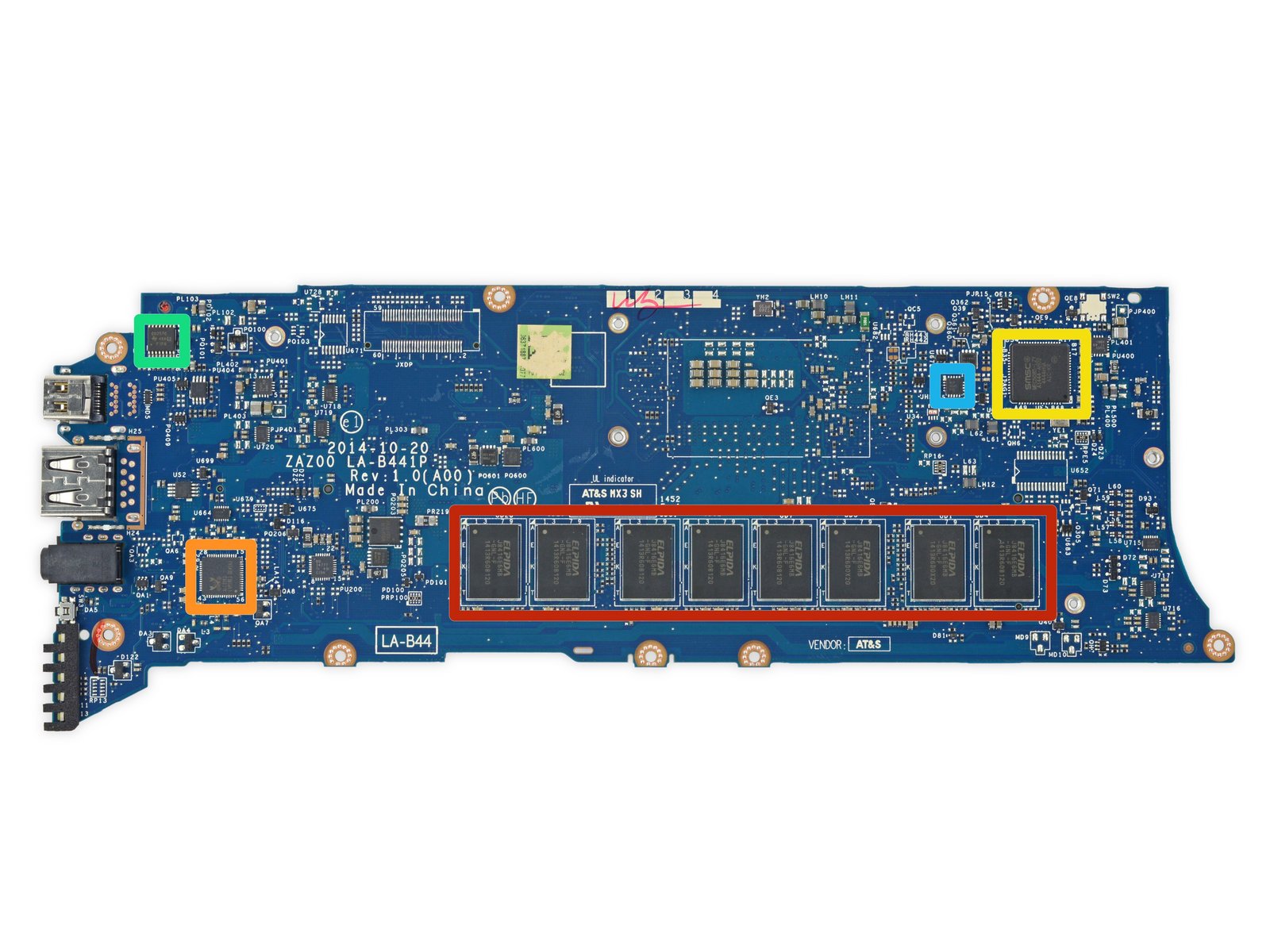
The Dell XPS 13 is one of many laptops with RAM soldered directly onto the motherboard.

Once upon a time, you could open up your laptop, pop in some new RAM or a bigger hard drive, and get an extra couple years out of your computer. But that’s often not the case anymore. “We’ve grudgingly accepted that most mobile CPUs are soldered onto the motherboard these days, and frequently that’s the only option the manufacturer has—that’s how they come from Intel,” says Suovanen. But RAM and storage are often soldered to the motherboard unnecessarily, eliminating the possibility of otherwise easy upgrades. “There’s no reason why you can’t have a very thin, very light device with modular RAM and a removable blade SSD. We know because we’ve seen it done in devices like the LG Gram and the HP EliteBook line (which is particularly repair-friendly).” When you see a label that says “no user serviceable parts inside,” you know the manufacturer has soldered everything together and you have no chance of squeezing a few extra years out of the device when it slows down.

Making It Impossible to Disassemble a Device Without Destroying It

Good luck trying to put this back together.

In the most egregious cases of planned obsolescence, manufacturers will make a device difficult or impossible to open…at least, without inflicting irreparable damage. “The Surface Laptop is one of the only devices that we’ve awarded a 0 out of 10 in repairability, because it was so obvious that it was designed never to be taken apart or serviced—even by professionals,” says Suovanen. “In a nutshell, Microsoft ultrasonically welded the chassis together and then glued an fabric cover down over the top. There’s no way to take that apart without destroying it…you could put it back together with a roll of duct tape, but that’s about it.” That means if your device breaks, you’re completely out of luck—the manufacturer may give you a new device under warranty, but if your warranty has ended, you’re basically stuck buying an entirely new laptop.

Refusing to Sell Replacement Parts

Apple won’t sell you an official replacement battery, so be sure to buy your iPhone X replacement battery from a trusted source, like iFixit.

Design choices aren’t the only way manufacturers prevent repair. Many companies, for example, choose not to offer official replacement parts to individuals or repair techs. “We’re used to being able to buy replacement parts for our cars and appliances, but that’s often not the case with your smartphone or laptop,” Suovanen says. And when manufacturers refuse to sell Original Equipment Manufacturer (OEM) parts, repair shops and users have to turn to third-party components instead, which can be problematic.

“It’s very hard to find good parts when the market is flooded with low-quality imitations that don’t perform well. In the case of batteries in particular, some of those third-party components can be dangerous—a cheap battery can destroy your device, or burn down your house.” Here at iFixit, we do the legwork for you, sourcing the highest quality parts we can find and testing them thoroughly before selling them in our store. But if you go searching for a replacement battery elsewhere, there’s no guarantee of what you’ll get. This whole process would be much easier and safer if people were able to buy official parts direct from the manufacturer.

Even when you can find an OEM part, some manufacturers put restrictions in place that prevent you from using it to the fullest. “If you replace the screen on your iPhone—even if it’s with a brand new OEM screen off of another identical iPhone—certain features like TrueTone won’t work correctly,” says Suovanen. This compels users to go directly to the manufacturer for repairs, no matter what they cost.

Claiming Repairs Are Impossible or Too Expensive

Your iPhone’s data may be recoverable, but Apple won’t help you.

Finally, manufacturers will falsely tell users that certain repairs can’t be done, even when independent shops are perfectly capable of performing them. “People go to the Genius Bar with very common problems that our repair community knows how to fix, but Apple tells them it can’t be done,” says Suovanen. For example, Apple won’t help you recover data on a water-damaged iPhone, and they won’t refer you to third-party repair shops who can. In other cases, they may quote a repair price that’s high enough that most customers will just throw up their hands and buy a new device.

The ability to repair is crucial. When you repair instead of replace, your devices last longer, you prevent e-waste, and you keep a bit more money in your wallet. Manufacturers would rather you buy something new, but we can do better. Hearings on your right to repair are coming up in the next few weeks in California and Oregon, and we’re expecting a floor vote on the Minnesota bill. Call your legislator and tell them you support right to repair!

Huawei P30 Pro Teardown: Not Quite Black Hole Photography, but Close

The new Huawei P30 Pro aims for superlatives in mobile photography: a new sensor pattern for its main camera, a 50x SuperZoom, and four cameras in total. You might not be able to take pictures of black holes with it, but it feels like we’re getting closer with each iteration. In the meantime, we scrutinized what’s inside the phone.

Huawei P30 Pro Teardown

Looking closely, the in-display fingerprint sensor is new to the Huawei P series. We’ve already seen this in the OnePlus 6T and a few other phones though. What definitely is breaking news? The Acoustic Display Technology which replaces the traditional earpiece speaker. This feature might shake up the smartphone industry. But it also might be a total disaster in terms of repairability; we’ll check that out soon. Until then, see what else we found below—or jump right ahead to the full teardown.

Huawei P30 Pro Teardown highlights:

  • The battery comes with handy tabs and offers 16.04 Wh. That’s on par with the Mate 20 Pro, but still beats the Galaxy S10+ (15.79 Wh)—not to mention the iPhone XS Max (12.08 Wh).
  • Wireless (reverse) charging is becoming a standard among flagship phones—that means double the glass, on the front and the back of the phone.
  • With its technical features, the P30 Pro strongly resembles the Mate series, which reflects the same repairability rating of 4 out of 10.

Friday, April 12, 2019

Right to Repair Is a Free Market Issue

Top image by Johan Viirok/Flickr

Last Week, The New York Times’ editorial board endorsed the Right to Repair movement. While spurred by Sen. Elizabeth Warren’s (D-Mass.) support for a farmer-focused repair bill, the Times’ board went further. “Owners of consumer electronic products deserve the same protection as farmers,” the Times wrote, and they also saw “a clear need for a national and enforceable standard.”

The Times’ editorial posted Saturday. By Sunday night, free-market advocates had a response ready… kind of. Jeffrey A. Tucker, Editorial Director for the American Institute for Economic Research, claimed that the Right to Repair movement is “not the free market at work,” but instead “government intervention that steals the language of market competition to invalidate property rights and contracts.”

He couldn’t be more wrong. The backup for Tucker’s claims is muddled, sometimes contradictory, and seemingly written as a knee-jerk response to the New York Times’ sudden appearance in the Right to Repair debate. It’s too bad, because many, or most, of the best arguments for Right to Repair are free-market arguments.

Here’s why we think free market advocates like Tucker—and many repair professionals— should be comfortable with what the Right to Repair movement is really trying to achieve.

Right to Repair Does Not Interfere with Warranties or Contracts

Tucker suggests that allowing owners and third parties to fix fixing devices could be “an invitation to scam artists” to mess up devices with no concern, since the customer could then fall back on their warranty to have a company fix the issue. Right to Repair legislation, he later writes, could impose “a legal obligation to comply with a warranty no matter what.”

Here’s something about Right to Repair that’s very easy to explain and understand: Right to Repair does not interfere with any company’s warranty. Warranties, with rare exceptions, are conditional, limited, and spelled out clearly, under the Magnuson Moss Warranty Act of 1975. But warranties can cover as much or as little of your product as the company likes, so long as they stick to that contract. You agree to those terms when you buy the thing.

Nobody advocating for Right to Repair—not iFixit, not The Repair Association, not Sen. Warren, nor the New York Times—thinks that John Deere should be forced to fix the tractor you’ve turned into a Mad Max prop, or that Apple has to repair your iPhone after a cheap eBay battery exploded. Warranties are a set of promises, usually very limited, that a company will repair or replace your device if it fails in unexpected ways.

Instead, Right to Repair is about allowing people other than the product maker to fix the thing you own outside the warranty. It has very little to do with the company’s obligations under their own warranty. Suggesting that the Right to Repair movement is trying to turn warranties into idealistic consumer fantasies is misdirection.

Failed Markets, Not Fake Markets

Tucker introduces a car analogy (not uncommon in technology discussions) to suggest a law is not needed. He ends up proving how effective such laws can be instead:

Think about this as it relates to cars. If you own a ten-year-old Honda, do you take it to the dealer? If you do, you either don’t know the racket or you don’t care about money. Everyone knows, one supposes, that going to the dealer for simple repairs is a financial mistake. More complex repairs require that the user make more careful decisions.

In other words, the free market here seems to be working just fine, without impositions of new laws that risk creating strange distortions in the market.

Tucker is right that local shops are the place to take your car for most fixes. That’s largely due to the foundational laws of the Right to Repair movement, the Clean Air Act Amendments of 1990 and the Motor Vehicle Owners’ Right to Repair Act of 2012

The 1990 Amendments demanded that every U.S. car be able to monitor its own emissions by 1996. In order to do that, repair shops needed a standardized way to interface with the car’s monitors. Thus was born the OBD-II port, which ensured that you don’t have to pay a ransom for every Check Engine light.

But cars continued to get more complicated, and companies more secretive, after 1996. Massachusetts residents responded by voting in a repair-minded ballot initiative in 2012. After that, the major trade groups representing car makers agreed to incorporate the initiative as a national standard, rather than wait for a patchwork of state bills to follow. Now repair shops can access the same diagnostic tools and data as dealerships, beyond just the OBD-II port. Before this legislation and the more-even playing field it created, car makers had what Tucker himself describes as “a very obvious economic incentive . . . to exaggerate the dangers of unapproved repairs.”

So, certainly, we invite people to think about their broader right to repair as it relates to cars.

Right to Repair Scales Back Other Overreaching Regulations Like Copyright

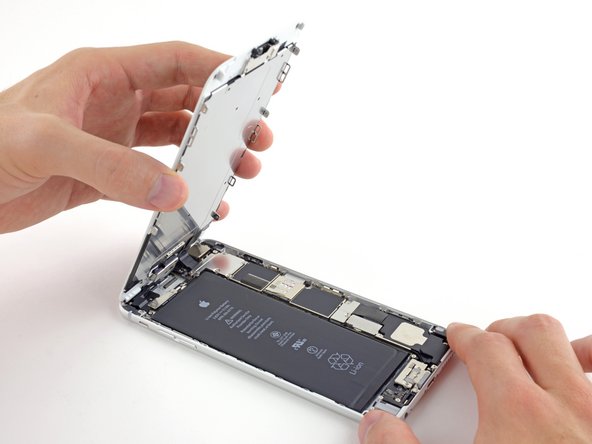
iPhone opened up with battery showing

Some free market advocates argue that Right to Repair is pushing for overreaching regulations. We’d argue the opposite. Copyright law, as it pertains to software, is an overreach that Right to Repair laws work to scale back, making the market freer for average consumers.

We’re not the only ones that think so. Reason, a libertarian magazine, wrote about this misuse of copyright in June 2018, after Eric Lundgren was sentenced to prison for cloning Windows restore CDs. Reason quotes Kit Walsh, attorney with the Electronic Frontier Foundation, on the clash between strict copyright restrictions on software and living with software all around us:

“The list of products and technologies that are affected by this restriction is practically infinite because it’s anything that has software embedded in it,” says Walsh. “There’s a lingering hook that the seller has in your property that they are arguing gives them really broad powers to dictate how you use that property going forward.”

Writing at the blog Being Libertarian, Alon Ganon details the many ways Apple has intruded to stop third-party repairs, while simultaneously refusing to fix many of their products’ inherent design flaws (including “Flexgate” and its many variants). Ganon ends on this call to action:

So in conclusion, libertarians and conservatives should work together to enact right to repair legislation just like we have for computers and automobiles, for cell phones and every device we can purchase. The fact is once I have purchased an item and it is in my possession, I should have an inalienable right to do whatever I please with my own property without interference from any government mandate or law passed through some corporate protectionist lobbyist.

Demanding that companies stop putting artificial limits on your ability to make your stuff work better and last longer is not intrusive regulation. It’s giving people the freedom to work toward something better. That’s why the Times endorsed the movement, and why we fight for it.

Thursday, April 11, 2019

Witty Writing and the Principles of Dadaism

Dadaism, while an often unheard of movement, has had a huge impact on modern artwork and literature across the globe, especially witty writing. This short-lived movement was born out of the need to rebel against nationalism as European artists were forced from their homes in the early 20th century. The harsh realities of World War […]

The post Witty Writing and the Principles of Dadaism appeared first on WTD.

Monday, April 8, 2019

What to Do When Your iPhone Screen Breaks

When you drop your phone, time tends to slow down. It slips out of your hand and makes a beeline for the concrete, your heart dropping into your stomach as you grit your teeth and hope. It’s not the end of the world if your screen breaks, though. Here’s what you can do to bring your iPhone back to its former glory.

How to Fix a Cracked or Shattered iPhone Screen

First things first: you probably want to get that screen fixed. You have a couple of options, but the cost can vary a lot depending on whether you have AppleCare+.

Fix It Yourself for Less

If you have an iPhone 8 or older, we sell complete iPhone Screen Fix Kits that come with all of the tools and parts you need to replace the screen yourself, and they’re much cheaper than what Apple charges.

For instance, our iPhone 8 screen replacement kit is only $79. The same repair done by Apple would cost you almost 90% more. Granted, you have to do the repair yourself, but replacing the screen on an iPhone is actually pretty easy. There’s a bit of adhesive you have to get through, but from there it’s just screws and connectors. Not only will you feel accomplished at the end of the repair, but your wallet will thank you.

We also sell iPhone screen replacement kits for older models, all the way down the iPhone 4S, which Apple weirdly charges more to replace than the iPhone 8 Plus. You can do it yourself for $39, compared to the $199 Apple would charge you.

We sell replacement screens for the iPhone X (as well as the iPhone XR, XS, and XS Max), but unfortunately, they’re not cheaper than Apple’s out-of-warranty cost. So if you end up cracking the screen on your newer iPhone, your best bet is to just go straight to Apple.

There is one caveat: Replacing the screen yourself will disable True Tone, which automatically adjusts the color temperature of the display based on the ambient light in your current environment. It’s not a crucial feature by any means, but it’s definitely something you should know if you want to go the DIY route.

Get It Repaired by Apple

Unfortunately, the free AppleCare warranty that comes with every iPhone doesn’t cover accidental damage—which, sadly, includes cracked screens. So unless you purchased the more all-inclusive AppleCare+ insurance, it’ll cost you a pretty penny to get your screen fixed by Apple.

Without AppleCare+, a screen repair costs around $149 for older phones like the iPhone 7 and 8, but that cost goes up as the phone gets bigger and more complex—up to $329 for the iPhone XS Max.

If you did spring for AppleCare+, the repair is much cheaper—just $29 for any iPhone model. Unfortunately, you can only take advantage of that service twice, and you still have to pay as much as $199 to get AppleCare+ in the first place. Still, depending on the model, that up-front cost will save you money even if you end up shattering your screen just once in that two-year period.

How to Use Your Broken iPhone In the Meantime

Even if you have a plan to get your screen fixed, chances are you’ll have to wait at least a little bit—whether it’s for your Genius Bar appointment to come around, or for your replacement screen to ship to your front door.

Most of the time, you can probably get away with using your iPhone like you normally would, depending on where your screen cracked and how severe the damage is—the capacitive touch function will likely continue to work just fine.

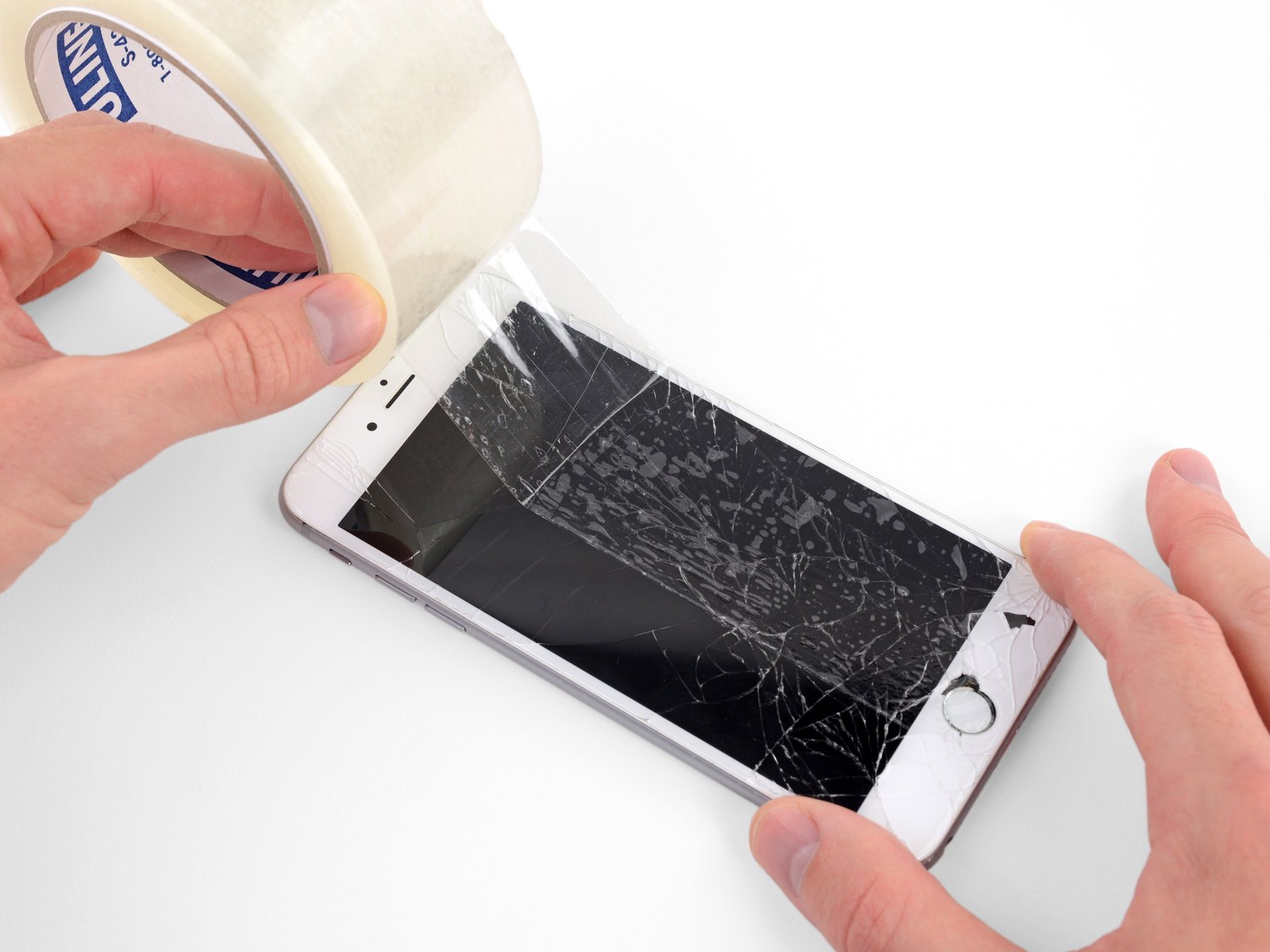
Sometimes, though, the glass will be damaged to the point of posing an injury risk for your fingers. If that’s the case, you can take some clear packaging tape and stick a layer on top of the screen to smooth down any jagged edges that could potentially slice your finger open. This is something you’ll want to do anyway when it comes time to replace the screen, depending on where the bulk of the damage is.
If the screen won’t register touch input, or your home button stopped working because of the drop, things get tougher. There is an iOS feature that lets you simulate the home button on the screen, but that only works if touch function is working.

If touch isn’t working at all (or is only partially working), there are a handful of things you can do to make the phone usable. Siri can perform a number of actions using just your voice, and you can tell her to turn on VoiceOver to hear a description of what’s happening on-screen. You can also plug in a USB keyboard with an adapter, which will at least allow you to enter your passcode and get important information backed up through iTunes.

How to Protect Your Newly-Replaced Screen

Shattering your screen is a wake-up call: it’s time to start protecting your phone. If you haven’t already, you should probably invest in a good case and screen protector.

A good case not only protects the phone from incurring dings, scuffs, and scratches around the body of the device (upping its resale value later on), but it can also absorb a lot of the shock that comes from dropping a phone onto a hard slab of concrete. Plus, a lot of cases have a small lip that extends past the surface of the phone, so even if your device landed flat on its face, the case’s lip edge would prevent the screen from making contact with concrete. And it’s one feature that you should absolutely have with whatever case you decide to go with.

Obviously, there are hundreds, if not thousands, of cases available on the market. If you want something that looks really great, I personally am a fan of Apple’s leather cases and have used them for years (and through plenty of accidental drops). There are lots of other great cases out there, too, from companies like Silk, tech21, Spigen, and Speck.

If you’re looking for the ultimate protection, OtterBox is known for having some of the toughest cases around, with lots of different styles and levels of protection to choose from. They may not be the cheapest, mind you, but they’re still much cheaper than a repair would cost further down the line.

A case can protect your screen from a lot of falls, but not all of them—if your screen takes a direct hit, it’s still in jeopardy. That’s where screen protectors can save the day, especially tempered glass options. While they’re really just meant to protect the screen from scratches and general wear and tear, I’ve seen first-hand the impact (no pun intended) that tempered glass screen protectors can make on a dropped phone—the screen protector will often crack while leaving your phone’s actual screen unscathed.

Of course, I wouldn’t rely on just a screen protector to save your phone from a drop, so your best bet is to pull double duty and get both a case and a screen protector for your iPhone. I’ve had both installed on all my iPhones since day one, and even after many accidental drops on concrete, I’ve never dealt with a broken screen.