You may have to wait to get your hands on theSamsung Galaxy Fold, but iFixit’s got your back with a fresh teardown! Unfold a chair and strap in—this one’s a doozy.
The big takeaway? This thing is Fragile with a capital ‘F.’ Asexpected, there are a ton of entry points for dust and other foreign matter to make their way inside, and there are so many different ways for the screen to break. In our case, it was something borrowed and blue—click through to see for yourself!
There are two batteries in this thing. And not just a dual-cell battery (likein the iPhone X), but two, completely separate batteries good for 16.87 Wh of total juice.
These bezels are super slim—theybarelycover two millimeters of the display, while leaving a 7 mm gap at the top and bottom. That doesn’t seem like much protection to us.
Two sliding hinges, a central geared hinge, and four spring-loaded clasps put the fold in this Fold. The display’s own rigidity provides the springy feeling when opening the phone.
Who could have guessed that Samsung’s Galaxy Fold would be such afragilePR nightmare? The iFixit folks who take apart and investigate mobile devices for a living, that’s who.
We’ve watched as Galaxy Fold review units broke forThe Verge,CNBC,Bloomberg,Wall Street Journal, and YouTube reviewerMarques Brownlee, each in interesting ways. And while it’s a new device, maybe even an all-new category, there’s still some aspects of the Fold’s brutal first act that we recognize.
I spoke with iFixit’s Lead Teardown EngineerSam Lionheartabout the Fold and the broken units we’d seen glimpses of thus far. I also talked with Dieter Bohn of The Verge about his experiences with his broken review unit. We talked about some potential problems with Samsung’s nearly $2,000 potential trendsetter. What follows are guesses at how the Fold is failing―informed guesses, based on more than a decade of examining the guts of similar devices, but guesses nonetheless.
First Off: OLED Screens Are Really Fragile
Samsung is the world’s leading maker of OLED displays, both by experience and market share. It makes the OLED displays for the iPhone X series, its own Galaxy phones, and about89 percent of the world’s AMOLED displays as of 2017.OLED displays havemany advantagesover more typical LCD displays: they work without backlights, they’re more power efficient, they can create brilliant colors. Most importantly, they’re the only kind of display that you can use in this kind of folding, hinged phablet.
But OLED screens are also far more delicate than LCDs, and prone to complete screen failure rather than localized damage. Any small crack in the encapsulation layer around the OLED layer can fatally damage the organic materials inside the display. Asindustry-watching site OLED-info notes, “OLEDS are very sensitive to oxygen and moisture and so the encapsulation layer is critical.” You get a sense of their brittleness fromseeing repair techs and enthusiasts talk about OLED fixes on Reddit.
The edges of OLED displays, in particular, are something Lionheart and other iFixit techs find challenging to disassemble or repair without damage. “We’ve definitely damaged those displays more when tearing them down, especially when curved,” Lionheart said. “It’s really easy to separate the OLED from the glass, and once that happens, that’s usually it for the screen.” Curved displays are particularly tough to fix,as shown in our Samsung Galaxy S6 Edge teardown.
OLED displays are like tiny, extremely thincleanroomsyou carry around, and any intrusion or stress on them is likely to kill their delicately balanced work. You might be able to see where we’re going with this.
OLED Plus Particles Equals Death
Knowing how OLEDs react to prying, moisture, oxygen, or nearly anything, it’s plain to see—from reviewers’ photos alone—that the Fold is literally inviting trouble into its fragile innards.
In pictures posted inThe Verge’s hands-on impressions(before their Fold review unit broke), you can clearly see gaps at the top and bottom of the hinge when the full screen is open. A close-up of the hinge on its side, with accumulated pocket detritus,makes it even clearer. And the back of the Fold, even with the hinge closed or partially open, doesn’t look airtight.
“These are some of the biggest ingress points I’ve seen on a modern phone,” Lionheart said. “Unless there’s some kind of magic membrane in there, dust will absolutely get in the back.” It’s important to note, too, that Samsung has offered noIP ratingfor the Fold.
Bohn finds it baffling the way his Fold unit broke. Especially because the first time he saw a “bump” under the Fold screen was late one night. After consulting with Samsung, he closed the phone and put it aside until the morning. The next day, examining the phone, Bohn saw two bumps under the screen.
“It seems odd to me that it appeared where it did,” Bohn said. “It’s hard to believe that I would not have noticed a piece of debris inching its way up from the bottom.” To us, this suggests the debris, both pieces, may have gotten in from the back hinge. Backing this up is German reviewer Lorenz Keller, whotweeted at Bohn that his Fold also developed a bump, at a point that was the mirror opposite of Bohn’s defects. Keller’s bump eventually went away, which may be the result of the hinge being open enough to allow debris back out.
Photos make it clear that while the screen is supported on its left and right panels, there’s flex room between the panels, as there must be for the device to bend with such a tight radius. That means a thinly-encased OLED screen bends inward and potentially presses against objects that got inside. Theinside of the deviceshows three hinges along the spine. If dirt can get into the spine of the Fold, it could also accumulate around those hinges, bringing them in contact with the fallible OLED layer, and that might explain the similarity between the bumps on Bohn and Keller’s review devices.
Why make a device with a fragile OLED layer, so little tolerance between screen and spine, and so many ways for dirt and moisture, to get in? Hubris? Testing with robots instead of real humans, with pockets and fingers and different ways of opening and closing things? These are questions that may go unanswered, even if we learn the cause of the defects.
Why Pre-Installed Screen Protectors Went So Wrong
Three of the review units that broke were due to the removal of a protective polymer layer that Samsung never intended for people to remove, as captured by Marques Brownlee.
PSA: There’s a layer that appears to be a screen protector on the Galaxy Fold’s display. It’s NOT a screen protector. Do NOT remove it.
I got this far peeling it off before the display spazzed and blacked out. Started over with a replacement. pic.twitter.com/ZhEG2Bqulr
Samsungstates that the layer is not for human hands to remove, nor will it support additional sreensavers. That tells you something about the display underneath. Pre-installed protective layers are not new;Samsung’s S10 series sports them. But because the flexible display is so fragile, people removing the protective layer—conditioned by years of removing the shipping plastic on their brand-new phones—are pressing their fingers and fingernails against the underlying surface, as well as applying uneven pressure across it. RIP OLED.
Robot Folding Versus Human Folding
What’s the difference betweenrobots built by Samsung,Lewis from UnboxTherapy, andDieter Bohn from The Verge? They all close the Fold with different gestures. Samsung’s robots, which the company states folded test devices 200,000 times, are pressing with perfectly even pressure across the phone’s outer plates, and opening with a similar even-force grace. In most situations, Dieter and Lewis press somewhere inside the display, on the display, to push the hinge out of its stay-open state and close the phone, then opening the phone up like a book, with their thumbs. Dieter tends to press near the bottom center of the Fold’s left panel, while Lewis, in opening and closing the Fold 1,000 times, hits a few different points in the middle and bottom. Yet another reviewer, Soldier Knows Best,closes the phone with a press in the upper-left of the inside display.
While no media review devices have yet failed due to folding issues, it’s worth noting that if any debris is inside the Fold’s hinge, or underneath the screen protector, pressing on the screen to close it could damage or aggravate the OLED enough to cause failures or problems. Neither reviewers nor yourself are likely to press very hard to close it, but uneven force, applied over thousands of instances, can lead to problems makers don’t always test for, Lionheart said. Samsung’s robots are running inside a cleanroom, while humans are using these devices in real-world conditions: lunch tables, outdoors, and in a hurry on the subway.
A Few More Potential Problems
From what we can tell, the Fold doesn’t seem to have a pre-scored line down the middle of the display to guide the screen when it folds. This is likely a benefit to the aesthetics of the device, so the screen resembles one big display instead of two distinct panels. Butwithout a scored line, the pressure from folding is applied in many different places, instead of down one uniform line.
Lionheart, who majored in graphic communication at college and spent considerable time around printing presses and label applicators, wonders if the crease in the Fold “can wiggle a bit, if you push on one side or another.” That kind of uneven pressure could cause kinks or puckers on the display, which might be an alternate explanation for the damage seen in the Verge review phone.
Both Bohn and Lionheart said that the Fold’s display would seem to need some kind of “play” or “float” to keep the screen from pressing against the edges of the display when opening or closing. “Like acarpet threshold, maybe,” Bohn said. Carpeting can stand to be pushed around a bit inside a container, but, as noted, OLED displays are not made to be bunched up or pressed upon by anything other than fingers.
We look forward to having more pictures and insights from the Fold as soon as we can take one apart. It’s a device with a lot of stories to tell.
As the Right to Repair movementreachesanall-timefeverpitch, tech manufacturers are focusing on one big lie in order to halt our progress: That you can’t trust independent repair shops, only the manufacturers themselves. This argument is a pile of manure.
Corporate lobbyists paint a bleak picture of third-party shops, arguing that these places use low-quality parts, install them improperly, and grift their customers. This couldn’t be further from the truth. In reality, most independent repair shops are no different than your friendly, local auto mechanic whom you recommend to your friends and family any chance you get. And many of them are fully capable of performing the same repairs that manufacturers do—plus some repairs the manufacturerswon’tdo.
Independent Shops Are Often as Good as the Manufacturers—If Not Better
Manufacturers constantly tell us that those who are properly trained and authorized by said manufacturers are the only ones who should be repairing our devices. But more often than not, independent repair shops are just as “properly trained” as anyone to fix your broken stuff.
Many independent repair technicians have gone through the same training and certification processes that manufacturers require out of their own technicians. It’s also not uncommon for independent repair shops to have former technicians from big manufacturers on staff, especially from companies like Apple, HP, Microsoft, and others. We even have our ownMasterTech certificationthat independent repair technicians can earn to prove their proficiency.
What’s more, many common repairs don’t require extensive expertise. You don’t need years and years of training to replace a smartphone battery or a cracked screen. In fact,we constantly receive success storiesfrom folks all over the world who have fixed their own device without any former training or knowledge. Obviously, you want your professional repair technician to be competent, but we’re just saying you don’t need a master’s degree in engineering and a handful of certifications to be good at fixing stuff.
Gabriel, who has been in the industry since 2002 and is currently the Operations Manager atThe Computer Cellarin Durham, NC, can attest to this. “We’ve met teenagers that have walked into the shop and started discussing computers and technology with us and we’ve said to each other, ‘that kid could do our job,’” he says.
This is true even of those more complex repairs the manufacturers won’t tackle. “One of our ex-techs joined us at 19 with only hobbyist experience,” Gabriel says. “When he left, he was teaching himself board-level repairs. He’s now, at 22, pulling a better salary than me, plus some stellar benefits, working for a university.”
“Board-level” repairs involve fixing the circuit board itself by replacing individual components, instead of replacing the entire expensive circuit board. These advanced repairs requiremicrosoldering skills, specialized equipment, and a very steady hand.
So what about those repair parts that manufacturers keep harping on? Well, your local shop has a reputation to uphold. It’s in their interest to use a reliable part that meets your high expectations. While it can be difficult (or impossible) to source genuine OEM parts (most cell phone manufacturers, with the notable exception ofMotorola, don’t sell their parts to anyone), it’s not too difficult to find aftermarket components that come from the same suppliers that manufacturers use.
“As surprising at it seems, you can buy an original Apple LCD,” says Alexandre Isaac ofPhone Repair Toulousein France. “You need the right contact in China. They usually buy it directly from the factory, as Apple can’t really control perfectly these millions of screens, so Foxconn still sells a few on the side.”
Furthermore, a lot of shops will harvest the good parts out of other broken devices in order to get that coveted OEM logo. “When appropriately refurbished with good tools, these are great and are the best solution,” says Isaac.
In fact, we know that a lot of repair shops use high-quality parts, because in some cases, we’re the ones that supply those parts! Through ouriFixit Pro wholesale partsprogram, we partner with independent repair shops and offer our parts, tools, and support so that those repair shops can offer their customers a great experience. All of our partsare sourced from reputable, trustworthy suppliers, and we doextensive in-house testingon everything to make sure it’s up to snuff.
Independent Shops Can Perform Repairs That Some Manufacturers Won’t
Most manufacturers focus their repair training on the most frequent repairs. Apple, for example, won’t replace lightning ports in their stores—getting this service requires shipping your device to a dedicated Apple service center. It’s not uncommon for manufacturers to turn away repair jobs, either because it’s not worth their time and effort, or because they don’t have the proper tools and expertise to do the repair. Independent repair shops, however, are much more willing to do these more challenging jobs.
Isaac can attest to this, explaining that manufacturer technicians “are usually ‘good repairmen,’ but they don’t have the level that people repairing boards have, and will never have unless they train. So the Genius from Apple is even worse. He only knows how to use software that says a few things about the phone.”
Josephine and Dave Billard’s experience with their water-damaged iPhoneis a great example. Here’s the short version: the couple wanted their photos recovered from an unresponsive iPhone, but Apple said they couldn’t help. They were able to find an independent repair shop (iPad Rehabnear Rochester, NY) that could perform more complex board-level repairs, getting the phone up and running just long enough to back up the photos. Apple doesn’t have the necessary tools for jobs like this, so without this independent repair shop, Josephine and Dave would’ve lost their vacation photos forever.
We could spend all day sharing stories of manufacturers’ inability to perform repairs. Odds are you’ve run into this yourself! My own father-in-law, for example, experienced an unresponsive screen one random day with his5th-generation iPod Touch. Apple said they couldn’t fix it, so he ended up just buying a new iPod Touch. This kind of repair isdefinitely possible, and a whole new screen assemblyis just $40. A local repair shop could perform this repair for much less than the cost of a new iPod Touch.
Is There Any Risk Involved with Independent Repair Shops?
No matter what the situation is, there’s always going to besomerisk involved during a repair, whether it’s a phone, car, refrigerator, or toaster. But for the most part, that risk is pretty low.
For starters, taking your broken device to an independent repair shop won’t void the device’s warranty with the manufacturer. Contrary to popular belief, it’sactually illegal for a company to void your warrantyjust because it was opened up and repaired by you or someone else. So don’t worry:Those warranty-voiding stickersare completely unenforceable and should be ignored.
Secondly, going to a reputable and trustworthy independent repair shop is perhaps no riskier than bringing the device to the manufacturer itself. Again, many shops are highly trained and use high-quality parts in their repairs. Plus, any good shop worth its salt will offer their own warranty on both the repair and the parts.
Of course, there are absolutely some shady repair shops out there, just like how there are shady mechanics (and dentists, surprisingly) who will try to rip you off. And there are also repair shops who may mean well, but are out of their skill level with certain repairs. Which is why you should take some time to find a reputable repair shop.
How to Find a Trustworthy Independent Repair Shop
Before you take your device into an independent repair shop, you first have to find a trustworthy and reputable shop to handle your repair, which is perhaps the most difficult part of the process.
It’s no different than finding a good, reputable auto mechanic. Ask for recommendations from friends and family who have patronised independent repair shops in the past—this is probably the best way to find a good shop that can service your broken device, as those who have gone through the same thing as you’re about to go through can provide valuable insight into a shop’s trustworthiness and level of customer service. We have found that pros who contribute to iFixit tend to run pretty fantastic businesses, and we have adirectory of them.
You can also scour review sites likeYelp, or look at ratings and reviews on Facebook and Google. Even though online reviews can be gamed, they’re generally a decent indicator of whether a repair shop is terrible or not.
Once you narrow your choices down to a couple of shops, don’t be afraid to ask questions about their credentials and the quality of their parts. And especially ask them how much experience they have repairing your specific device.
Word of mouth is a powerful thing. And asking the right questions can give you a good idea whether or not a certain repair shop is a good fit.
“Dryers aren’t all that different than phones,” I say to the phone repair techs riding in the truck with me. They’re nervous. A few weeks ago, I fired off a quick late-night email, inviting them to tag along on an appliance repair call. Right now they’re focused on mobile phone repair, but I told them they needed to diversify their skills into other new and fast-growing verticals.
“Repair is constant problem solving,” I wrote. “If you’re not learning and growing, you’re setting yourself up to fail.” They believe it. Now we’re on our way to look at a fridge that’s stopped cooling food.
One tech, Dan, can fix most phone issues in about 15 or 20 minutes, but he’s never touched an appliance before. He tells me that his dishwasher has been out for a few months, but he’s too timid to open it up. As we approach the customer’s house, I reassure him fridges are just like the phones he cracks open every day. The only difference is that the device is about 50 pounds heavier and the screws are 10 times as big. Other than that, it’s not that different—these days, the fridge and the iPhone X he just fixed cost the same.
As we walk in, the customer explains when it started happening (two days ago) and what led up to the failure (clicking every three to five minutes). I hold the fridge open and listen. Nothing. We pull the fridge away from the wall a couple of feet and unscrew the back panel, revealing something that looks like the air compressor my dad used to fill my bike tires. I inspect a small black triangular box attached to the compressor and, based on the reported clicking sound, decide to pull it off to test it. Dan, the appliance-averse tech, brings out aFluke multimeter, then connects the leads to check for resistance. Nothing.
Our customer has a failed compressor relay switch on their refrigerator. This component listens to the main control board of the fridge, which monitors a thermostat inside to determine when more cold air is needed. The board sends the signal, and this little triangle relays to the compressor that it’s time to circulate refrigerant and cool things down.
“Here’s our culprit!” I say, showing the customer the switch. “It’s not working, so even though the fridge has power, it doesn’t have the capability to cool itself. The part will set you back about $30-50.” Dan installs the new compressor relay we brought along. This time, when he holds the fridge door open:Click. Bzzzzhmmmmmmmm.All systems normal, another patient saved.
Repair is messy. It’s fickle. Spiteful. Frustrating. Exhilarating. Rewarding. Empowering. Repair can make you feel every one of these things all at once and then make you come begging for more. As consumers, it’s a fundamental right we have: to fix (or have others fix) the things we own. Unfortunately, it’s a right that we don’t exercise enough.
Manufacturers take an increasingly aggressive stance against DIY or third-party repair, especially in the realm of computers and electronics. They wield murky legalese and questionable intellectual property claims to stifle the rights of people worldwide to fix what’s theirs. They lead us to believe these devices aren’t made to be repaired. When your phone cracks, it’s just a fact of life. You’re being conditioned by aggressive sales, contract pricing, and obscure repair detailsinto thinking that an iPhone or a Galaxy only has two or three years before it’s obsolete.
But when your washer starts having issues cleaning your undies, it’s not disposable, is it? It’s an emergency that must be fixed right away. You don’t run down to Sears (RIP) and buy a new one, you figure out what needs fixing. Most modern appliances are built to last about 10 years, and the dirty manufacturing secret is that most electronics are capable of lasting the same amount of time.
Manufacturers like Samsung and LG sell both phones and appliances. If an appliance of yours is broken, a quick Google search for the model number and the symptom pulls up thousands of results. You’ll find out how the device is assembled, wiring schematics, troubleshooting basics, and an array of readily available original parts for purchase. These parts are often generic and cross-compatible between devices. Unfortunately, the same amenities don’t exist for their phones—finding OEM parts, guides, schematics, and troubleshooting answers can sometimes be impossible. That’s because these manufacturers havechosento support their appliances with third-party partnerships that provide necessary materials—but not their phones.
Last year, when some Samsung washing machines saw their lids pop off violently during use, the companypartneredwith DISH Network technicians to fix the issue, rather than rely on their limited number of in-house technicians. But when Samsung’s’s flagship smartphones wereliterally lighting on fire, customers were advised to put their phones in a fireproof box and…wait?
What makes a 50 pound refrigerator different, in repairability, than a smartphone? Both have fuses and capacitors. Both have computer chips and main control boards. Nobody wants to replace either one because of a slight defect. Yet manufacturers take much stronger stances against third parties for electronic repair than for appliances, even their own.
Here’s the rub: Everything breaks eventually, but in many cases, people are throwing away things that can actually be repaired. Phones and appliances are designed in relatively similar ways because the fundamentals are much the same. Both itemshave to deal with heat, insulate components against outside elements, and allow the user to issue commands. New models of each even cost about the same. So there’s no reason that we should accept that one is obsolete after two years while the other simply needs a tune-up.
Repair isn’t a dirty word. Obsolete is. To claim an old device is“sad”or “vintage,” and then actively work to discourage repair and reuse, is a heinous way to sell you something. All of these nefarious tactics are why we needRight to Repair legislationthat protects the rights of everyday consumers—to either repair their own things or to find a trusted third party of their choosing to do the job for them. Society shouldn’t be relegated by manufacturers to consumerist pollyannas. As Apple’s battery-gate exploitsand subsequentfinger-pointingfor poor revenues exposed, manufacturers do not always have your best interests at heart.
Apple announced Thursday, four days short of Earth Day, that it isexpanding its recycling programsby adding another phone-recycling robot, recovering more cobalt from phones, and building a research lab for electronics recycling. All of that is fine and good, but the robot is still a recycling PR move. Allowing the world to keep iPhones working, delaying recycling even further, would have a more meaningful impact.
Apple’s Recycling More Cobalt. That’s a Good Thing.
Let’s start with the broadly good news about cobalt reuse. Cobalt is a critical metalused in the electrodes of lithium-ion batteries. Demand for cobalt tripled between 2011 and 2016, according to Benchmark Mineral Intelligence, and isprojected to quadruple by 2029. The 6.6 grams of cobalt in aniPhone 6is roughly 5 percent of the phone’s weight, according toThe One Device: The Secret History of the iPhoneby Brian Merchant, and worth about 23 cents at the time of this writing. Combined with the other raw materials in the phone, that’s enough money to make it economically viable to attempt to recycle it.
60 percent of the world’s cobalt comes from the Democratic Republic of Congo, and a lot of it—up to 40 percent—is mined by hand, sometimes by children, in cramped, dangerous holes. An investigationby the Washington Postfound that such “artisanal” cobalt is often washed in the same water used for fishing and irrigation, leading to extremely unhealthy metal concentrations in residents. While Apple and other battery-buying companies have pledged to audit their supply chains for cobalt and other problematic metals, it’s extremely difficult to do so in environments with guarded depots, bribery, andbyzantine international markets.
So any recycling of cobalt, instead of more mining, is worth some praise. And because it’s so valuable, recyclers go out of their way to recover it. What Apple announced today isn’t an innovative recycling process—it’s a method of tracking to make sure that cobalt from the batteries they recycle makes it back into their own products. It’s paperwork, but it’s important paperwork.
Apple’s press release states that the company has created “a true closed loop” for cobalt.As iFixit’s CEO Kyle Wiens told Reuters, “Cobalt is mined in horrific conditions … Reducing cobalt consumption is a good thing across the board.” For this closed loop to be credible, though, it should be backed up by a third party audit by a credible firm likeUL Environment. It’s very possible they did that, and we encourage Apple to release the results of these audits.
Daisy the Recycling Robot Makes No Economic Sense
Now for the showiest portion of the announcement: Apple’s expansion of its press-friendly, proprietary recycling robot, Daisy. Given Apple’s own numbers, Daisy cannot possibly keep up with the scale of their manufacturing output, especially with newer Apple devices’increasingly shortened lifespanandrepair problems. Apple states that each Daisy machine (there are seemingly two of them) can disassemble 15 different iPhone models at a rate of 200 per hour, hypothetically 1.2 million a year. But theoretical throughput is a silly way to describe the process. In recycling, all that matters are real-world results. If you drive your car sixteen hours a day, you couldhypotheticallygo 350,000 miles a year. That doesn’t mean you will—or that you have that many places to go.
How many phones has Daisy recycled? Apple hasn’t told us, only how many devices they have received: 1 million in the last year. Even if Daisy was bullet-proof enough to operate at that sustained rate of 200 phones per hour, though, supply is going to be a problem: Apple doesn’t get that many iPhones back.
Why? People aren’t giving Apple back their phones, because old iPhones are worth dramatically more on the used market than the material cost orApple’s trade-in value. On Swappa, the4-plus-year-old iPhone 6 still sells for $100, while Apple will give you a $90 gift card. Even theiPhone 4 nets $40, while Apple offers nothing. You’d be crazy to destroy a perfectly functional $100 product to recover $0.23 worth of cobalt. The recyclers we regularly speak with rarely see newer-model iPhones, and when they do, they repair andresell them. They certainly don’t grind them up for raw materials. Even non-functional phones are parted out and sold to people like us, who are in desperate need oforiginal iPhone service parts.
Putting aside the supply logistics, the idea behind Daisy is compelling: with perfect knowledge of how a device is put together, you can build a machine that reverses the process and separates all the raw components. It’s easy to see why Apple, who excels at mass manufacturing, was drawn to a centralized approach. Just run the Foxconn assembly line in reverse, and use robots!
But, as with so many amazing ideas dreamed up in laboratories, the concept falls short in the real world. While manufacturing is centralized, recycling is not. At end of life, iPhones are more likely to end up at one of the many thousands of recycling facilitiesaroundtheworldthan at one of Apple’s 500 stores. Recyclers handle a dizzying variety of products, from smartphones to CRT televisions to plastic Rock Band guitars. Without government or manufacturer subsidies, using a different specialized machine to recycle each model of product is economically impossible.
I asked Kelley Keogh, co-founder ofGreeneye Partners, an electronics recycling auditing firm, what she thought of the project. “Without knowing/seeing their AI capabilities and robotics it’d be hard to judge.” But Koegh defended human disassembly: “I have seen very sophisticated facilities do this manually and quite well.”
Daisy’s fatal flaw is its model specificity. Recycling is a challenging business with slim margins. Recyclers need processes that can handle a broad array of tens of thousands of products. An expensive machine that can only disassemble 15 products just doesn’t make economic sense today.
Apple’s New Real-World Recycling Lab Has Promise
After the robot and cobalt news, Apple also announced that they launched a Material Recovery Lab. The 9,000-square-foot facility in Austin, Tex., “will look for innovative solutions involving robotics and machine learning to improve on traditional methods” of recycling. The lab, Apple says, will combine academics and Apple engineers to “propose solutions to today’s industry recycling challenges.”
Robots like Daisy are a radical approach to recycling that does not integrate well with traditional recycling systems. If Apple is going to provide their technical expertise to suggest incremental improvements existing recycling operations, that would be welcome news. Real-world recyclers need cost-effective technologies that they can integrate into their existing facilities.
It’s clear from the size and exceptionally clean sorting machinery Apple is showing off that their space is a lab, not an active sorting facility. If Apple shares their recycling finds with the wider industry, as the release claims they might, that’s a good thing. For this to be effective, this knowledge should be made publicly available for peer review by academics and adoption by recyclers around the world, in contrast with the secretive approach they have taken with Daisy so far.
But while improvements are welcome, the recycling industry has not been idly waiting for input. “I think often [manufacturing engineers] look at the materials recovery space and feel it has lacked effective R&D investment,” wrote Craig Boswell, president and co-founder of asset management firmHOBI International, in an email to iFixit. “This is far from the truth. There has been a tremendous amount of research on material shredding, separation, and cleaning techniques over the past 50 years. There have been a lot of advancements but some of the remaining issues represent tremendous technical challenges. I wish them the best.”
Envisioning a Greener Apple
Apple also touts refurbishing 7.8 million Apple devices in 2018, or about 3.6 percent of the 217.7 million iPhones sold that year. That’s great—reducing and reusing is better than recycling—but we think they could be doing a lot more to make their devices last longer outside their proprietary restoration system. They could allow thehome buttons on phones to be replacedand reprogrammed without needing asecretive machinethat locks out third-party or DIY repair. They could stop making MacBooksall but unrepairable, withkeyboards that necessitate expensive replacements. And they could offer some kind of low-cost recycling approach forAirPods,Apple Pencils,Magic Keyboards, and the rest of their devices with built-in batteries sealed with impenetrable glue.
Hidden behind the chrome glamour of a recycling robot, Apple’s announcements have the glimmer of some positive changes. The recycling lab is a great idea—a little late, but seemingly a move in a good direction. But they are avoiding the larger product design changes that would really benefit the earth. Recycling is good, but repair is noble.
Children at artisanal mine image by Julien Harneis/Wikimedia. Images of Apple’s Daisy and recycling lab via Apple.
Books can make, break, or elevate a brand. And author blunders destroy a book. A book is the ultimate business card and a creative way to expand your voice. Most of all, publishing a book is a powerful way to share your story and expertise in a way that can change someone’s life. As someone […]
The P30 Pro didn’t surprise us much, as there are a lot of assembly tricks that we’ve seen many times in the past (although the use ofPhillips screws throughoutis nice to see). The phone comes with anin-display fingerprint sensor, as well as an interesting new piece of tech calledAcoustic Display Technology, which sends sound vibrations through the display, rather than relying on a traditional earpiece speaker.
Overall, screen repairs are tricky with this one, but don’t let that stop you from seeing what’s inside your own P30 Pro. We have an awesome teardown wallpaper for you to download and stick on your home screen. Just open up this page on your phone and click on the photo to view it at full resolution. Then, save the image to your phone and set it as your wallpaper.
P.S. This is just our first stab at wallpapers for the P30 Pro. We’re working on more and we’ll publish them next week—but since you asked for them now, we figured we should give the people what they want.
Samsung’s much-anticipated Galaxy Fold phone/tablet hybrid is almost here. But with the April 26 release date inching closer, multiple reviewers are already having problems with the flexible OLED screen after a few days of use.
Dieter Bohn, writing forThe Verge, discovered a piece of debris had worked its way under the screen somehow after just a few days, before the screen broke entirely:
SUPER YIKES: something happened to my Galaxy Fold screen and caused a bulge. I don’t know how it happened, and I’m waiting to hear back from Samsung. It’s broken. https://t.co/p1014uB01Dpic.twitter.com/3FZJkWtSKr
In other cases, some reviewers peeled off a plastic cover that appeared to be a screen protector, but is actually a “polymer layer” that is supposed to stay on the screen. When peeled off, the screen becomes unusable, per Mark Gurman of Bloomberg:
The screen on my Galaxy Fold review unit is completely broken and unusable just two days in. Hard to know if this is widespread or not. pic.twitter.com/G0OHj3DQHw
If even the most tech-savvy reviewers think it’s a removable screen protector, it’s likely that most consumers will run into this same scenario as well. Samsungboasts about the device’s multi-layered design on its website, but clearly that isn’t working out for them as well as they’d hoped.
Samsung has yet to offer an official comment on the issue, but we’ll update this post when they do.
It’s unclear how many people were affected, since the most well-known examples are coming from tech reviewers with lots of reach on social media. It’s possible this is a bigger design flaw with the phone, and we’re anxious to examine the device more closely once we get our unit in the office.
Unlike the Highlander, your phone and laptop are not immortal. One day, something will break—you’ll crack the screen, or your battery will become so old it can’t hold a charge. Device manufacturers want you to buy a new device when that happens, instead of repairing the almost-perfectly-usable device you already have—and it shows in the design.
As the years have worn on, manufacturers have made more and more choices that prevent you from repairing your devices—some may be mere cost-cutting measures, while others are more egregious, locking you out for the sole purpose of preventing you from repairing your own device. Here are some of the most common examples.
Slapping “Warranty Void If Removed” Stickers on Your Gadget
Don’t be scared by these stickers—they’re illegal.
When you crack open the back panel on your device—or perhaps even before—you’ll often find a sticker that claims your warranty will be void if you break the seal. But “that’s illegal under theMagnuson-Moss Warranty Act of 1975,” says Jeff Suovanen, teardown engineer at iFixit. A manufacturer can’t deny a warranty repair for, say, your screen just because you replaced your own battery. “There are a lot of things manufacturers do to sort of passive-aggressively discourage you from fixing your stuff, but the warranty-void-if-removed stickers are much more overt.” This law has gone unenforced for too long, but thankfullythe FTC has begun cracking down on this misleading practice—thoughmany manufacturers are still doing it.
Using Rare or Proprietary Screws
Most people don’t have a tri-wing screwdriver lying around in their garage.
Everyone has a screwdriver at home, and some tech-savvy individuals may even have a set oftorx bitsin their toolbox. But manufacturers are increasingly using even harder-to-find screws that prevent you from getting inside the chassis.
“The easiest one to pick on is Apple, because they picked a screw design so obscure we’d never even heard of it,” says Suovanen. “And we know it wasn’t for engineering reasons, because the iPhone got along fine with ordinary Phillips screws—until all of a sudden theiPhone 4switched to pentalobe screws. But only on the outside—none of the interior screws were changed. Since no one had a pentalobe driver, the clear intent was to tamper-proof your iPhone.”
“Torx security screws are some of the most frustrating ones, because a lot of people have torx drivers in their toolbox,” says Suovanen. “But manufacturers take that extra little step and use atorx securitybit—which again, adds nothing engineering-wise to the device. It’s just an attempt to keep you out.” Some manufacturers don’t go quite this far, but will stillhide screws under rubber pads or other panels.
Gluing Instead of Using Screws
Microsoft’s Surface Pro 3 is one of many devices held together with glue rather than screws.
In the age of sleek, curved devices with no obvious seams,many manufacturers have turned to glueinstead of screws to hold things together. “There are legitimate reasons to use glue—like waterproofing,” says Suovanen. “But there is almost always a better way, like using screws and gaskets. Glue is very difficult to work with if you’re trying to repair something. It’s difficult to separate without breaking things, and it’s a pain to replace.” And when you use glue to hide those seams, it makes the device appear impossible to open, disincentivizing users to repair their device, instead of grabbing the ol’ Phillips head and taking a look inside.
Soldering Major Components Together to Make Upgrades and Repairs Impossible
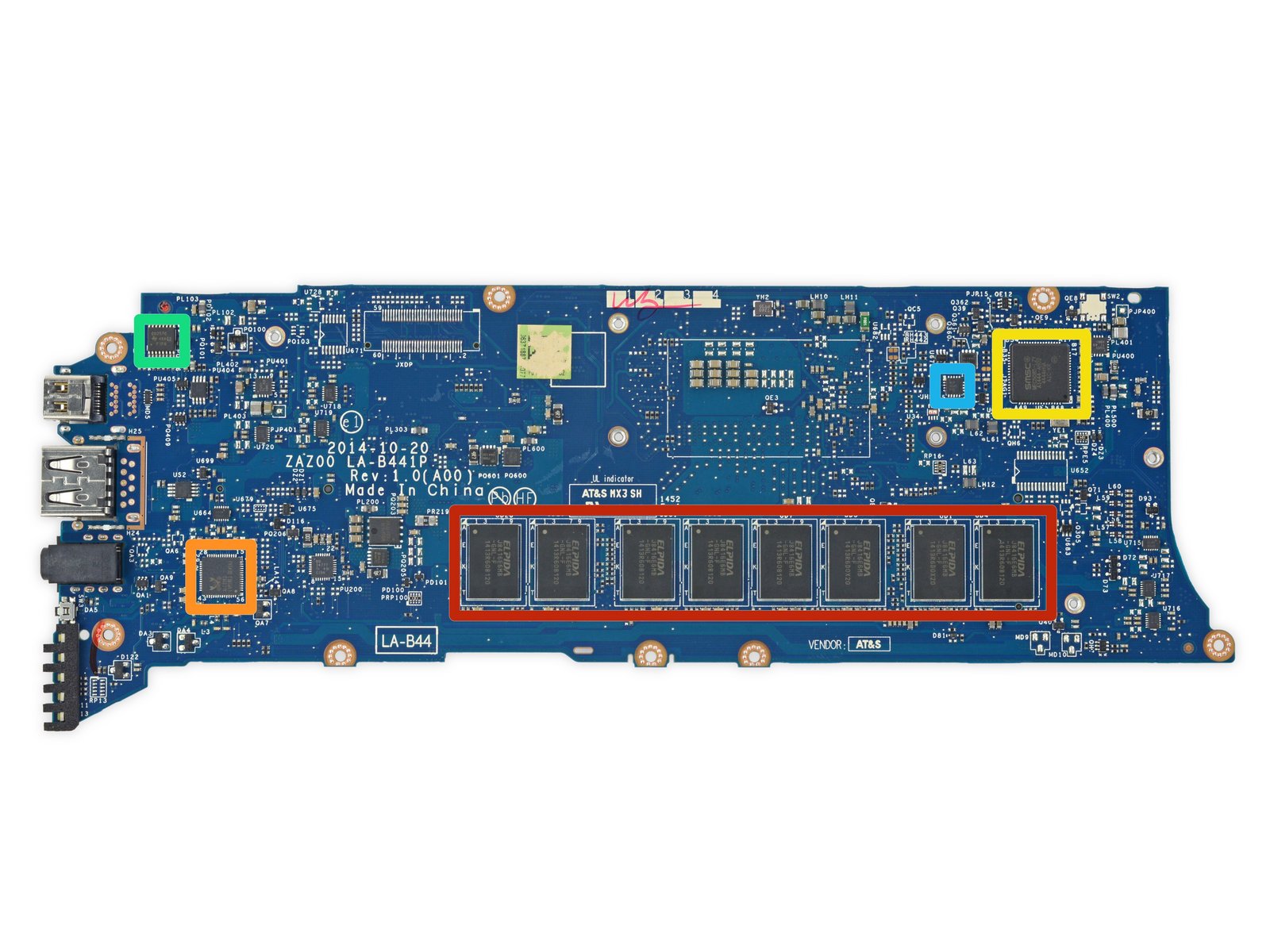
The Dell XPS 13 is one of many laptops with RAM soldered directly onto the motherboard.
Once upon a time, you could open up your laptop, pop in some new RAM or a bigger hard drive, and get an extra couple years out of your computer. But that’s often not the case anymore. “We’ve grudgingly accepted that most mobile CPUs are soldered onto the motherboard these days, and frequently that’s the only option the manufacturer has—that’s how they come from Intel,” says Suovanen. But RAM and storage are often soldered to the motherboard unnecessarily, eliminating the possibility of otherwise easy upgrades. “There’s no reason why you can’t have a very thin, very light device with modular RAM and a removable blade SSD. We know because we’ve seen it done in devices like theLG Gramand theHP EliteBook line(which isparticularly repair-friendly).” When you see a label that says “no user serviceable parts inside,” you know the manufacturer has soldered everything together and you have no chance of squeezing a few extra years out of the device when it slows down.
Making It Impossible to Disassemble a Device Without Destroying It
Good luck trying to put this back together.
In the most egregious cases of planned obsolescence, manufacturers will make a device difficult or impossible to open…at least, without inflicting irreparable damage. “TheSurface Laptopis one of the only devices that we’ve awarded a 0 out of 10 in repairability, because it was so obvious that it was designed never to be taken apart or serviced—even by professionals,” says Suovanen. “In a nutshell, Microsoftultrasonically weldedthe chassis together and then glued an fabric cover down over the top. There’s no way to take that apart without destroying it…you could put it back together with a roll of duct tape, but that’s about it.” That means if your device breaks, you’re completely out of luck—the manufacturer may give you a new device under warranty, but if your warranty has ended, you’re basically stuck buying an entirely new laptop.
Refusing to Sell Replacement Parts
Apple won’t sell you an official replacement battery, so be sure to buy your iPhone X replacement battery from a trusted source, like iFixit.
Design choices aren’t the only way manufacturers prevent repair. Many companies, for example, choose not to offer official replacement parts to individuals or repair techs. “We’re used to being able to buy replacement parts for our cars and appliances, but that’s often not the case with your smartphone or laptop,” Suovanen says. And when manufacturers refuse to sell Original Equipment Manufacturer (OEM) parts, repair shops and users have to turn to third-party components instead, which can be problematic.
“It’s very hard to find good parts when the market is flooded with low-quality imitations that don’t perform well. In the case of batteries in particular, some of those third-party components can be dangerous—a cheap battery can destroy your device, or burn down your house.” Here at iFixit, we do the legwork for you, sourcing the highest quality parts we can find and testing them thoroughly before selling them inour store. But if you go searching for a replacement battery elsewhere, there’s no guarantee of what you’ll get. This whole process would be much easier and safer if people were able to buy official parts direct from the manufacturer.
Even when youcanfind an OEM part, some manufacturers put restrictions in place that prevent you from using it to the fullest. “If youreplace the screen on your iPhone—even if it’s with a brand new OEM screen off of another identical iPhone—certain features like TrueTone won’t work correctly,” says Suovanen. This compels users to go directly to the manufacturer for repairs, no matter what they cost.
Claiming Repairs Are Impossible or Too Expensive
Your iPhone’s data may be recoverable, but Apple won’t help you.
Finally, manufacturers will falsely tell users that certain repairs can’t be done, even when independent shops are perfectly capable of performing them. “People go to the Genius Bar with very common problems that our repair community knows how to fix, but Apple tells them it can’t be done,” says Suovanen. For example, Applewon’t help you recover data on a water-damaged iPhone, and they won’t refer you to third-party repair shops who can. In other cases, they may quote a repair price that’s high enough that most customers will just throw up their hands and buy a new device.
The ability to repair is crucial. When you repair instead of replace, your devices last longer, you prevent e-waste, and you keep a bit more money in your wallet. Manufacturers would rather you buy something new, but we can do better. Hearings on your right to repair are coming up in the next few weeks inCaliforniaandOregon, and we’re expecting a floor vote on theMinnesotabill. Call your legislator and tell them you support right to repair!
The newHuawei P30 Proaims for superlatives in mobile photography: a new sensor pattern for its main camera, a 50x SuperZoom, and four cameras in total. You might not be able to take pictures of black holes with it, but it feels like we’re getting closer with each iteration. In the meantime, we scrutinized what’sinsidethe phone.
Looking closely, the in-display fingerprint sensor is new to the Huawei P series. We’ve already seen this in the OnePlus 6T and a few other phones though. What definitelyisbreaking news? The Acoustic Display Technology which replaces the traditional earpiece speaker. This feature might shake up the smartphone industry. But it also might be a total disaster in terms of repairability; we’ll check that out soon. Until then, see what else we found below—or jump right ahead to the full teardown.
The battery comes with handy tabs and offers 16.04 Wh. That’s on par with the Mate 20 Pro, but still beats the Galaxy S10+ (15.79 Wh)—not to mention the iPhone XS Max (12.08 Wh).
Wireless (reverse) charging is becoming a standard among flagship phones—that means double the glass, on the frontandthe back of the phone.
With its technical features, the P30 Pro strongly resembles the Mate series, which reflects the same repairability rating of 4 out of 10.
Last Week, The New York Times’ editorial boardendorsed the Right to Repair movement. While spurred by Sen. Elizabeth Warren’s (D-Mass.) support fora farmer-focused repair bill, the Times’ board went further. “Owners of consumer electronic products deserve the same protection as farmers,” the Times wrote, and they also saw “a clear need for a national and enforceable standard.”
The Times’ editorial posted Saturday. By Sunday night, free-market advocates had a response ready… kind of. Jeffrey A. Tucker, Editorial Director for theAmerican Institute for Economic Research, claimed that the Right to Repair movement is “not the free market at work,” but instead “government intervention that steals the language of market competition to invalidate property rights and contracts.”
He couldn’t be more wrong. The backup for Tucker’s claims is muddled, sometimes contradictory, and seemingly written as a knee-jerk response to the New York Times’ sudden appearance in the Right to Repair debate. It’s too bad, because many, or most, of the best arguments for Right to Repairarefree-market arguments.
Here’s why we think free market advocates like Tucker—and many repair professionals— should be comfortable with what the Right to Repair movement is really trying to achieve.
Right to Repair Does Not Interfere with Warranties or Contracts
Tucker suggests that allowing owners and third parties to fix fixing devices could be “an invitation to scam artists” to mess up devices with no concern, since the customer could then fall back on their warranty to have a company fix the issue. Right to Repair legislation, he later writes, could impose “a legal obligation to comply with a warranty no matter what.”
Here’s something about Right to Repair that’s very easy to explain and understand: Right to Repair does not interfere with any company’s warranty. Warranties, with rare exceptions, are conditional, limited, and spelled out clearly, under theMagnuson Moss Warranty Act of 1975. But warranties can cover as much or as little of your product as the company likes, so long as they stick to that contract. You agree to those terms when you buy the thing.
Nobody advocating for Right to Repair—not iFixit, not The Repair Association, not Sen. Warren, nor the New York Times—thinks that John Deere should be forced to fix the tractor you’ve turned into aMad Maxprop, or that Apple has to repair your iPhone after a cheap eBay battery exploded. Warranties are a set of promises, usually very limited, that a company will repair or replace your device if it fails in unexpected ways.
Instead, Right to Repair is about allowing people other than the product maker to fix the thing you ownoutsidethe warranty. It has very little to do with the company’s obligations under their own warranty. Suggesting that the Right to Repair movement is trying to turn warranties into idealistic consumer fantasies is misdirection.
Tucker introduces a car analogy (not uncommon in technology discussions) to suggest a law is not needed. He ends up proving how effective such laws can be instead:
Think about this as it relates to cars. If you own a ten-year-old Honda, do you take it to the dealer? If you do, you either don’t know the racket or you don’t care about money. Everyone knows, one supposes, that going to the dealer for simple repairs is a financial mistake. More complex repairs require that the user make more careful decisions.
In other words, the free market here seems to be working just fine, without impositions of new laws that risk creating strange distortions in the market.
The 1990 Amendments demanded that every U.S. car be able to monitor its own emissions by 1996. In order to do that, repair shops needed a standardized way to interface with the car’s monitors.Thus was born the OBD-II port, which ensured that you don’t have to pay a ransom for every Check Engine light.
But cars continued to get more complicated, and companies more secretive, after 1996. Massachusetts residents responded by voting in a repair-minded ballot initiative in 2012. After that, the major trade groups representing car makersagreed to incorporate the initiative as a national standard, rather than wait for a patchwork of state bills to follow. Now repair shops can access the same diagnostic tools and data as dealerships, beyond just the OBD-II port. Before this legislation and the more-even playing field it created, car makers had what Tucker himself describes as “a very obvious economic incentive . . . to exaggerate the dangers of unapproved repairs.”
So, certainly, we invite people to think about their broader right to repair as it relates to cars.
Right to Repair Scales Back Other Overreaching Regulations Like Copyright
Some free market advocates argue that Right to Repair is pushing for overreaching regulations. We’d argue the opposite. Copyright law, as it pertains to software, is an overreach that Right to Repair laws work to scale back, making the market freer for average consumers.
“The list of products and technologies that are affected by this restriction is practically infinite because it’s anything that has software embedded in it,” says Walsh. “There’s a lingering hook that the seller has in your property that they are arguing gives them really broad powers to dictate how you use that property going forward.”
Writing at the blog Being Libertarian, Alon Ganon details the many ways Apple has intruded to stop third-party repairs, while simultaneously refusing to fix many of their products’ inherent design flaws (including“Flexgate” and its many variants). Ganon ends on this call to action:
So in conclusion, libertarians and conservatives should work together to enact right to repair legislation just like we have for computers and automobiles, for cell phones and every device we can purchase. The fact is once I have purchased an item and it is in my possession, I should have an inalienable right to do whatever I please with my own property without interference from any government mandate or law passed through some corporate protectionist lobbyist.
Demanding that companies stop putting artificial limits on your ability to make your stuff work better and last longer is not intrusive regulation. It’s giving people the freedom to work toward something better. That’s why the Times endorsed the movement, and why we fight for it.
Dadaism, while an often unheard of movement, has had a huge impact on modern artwork and literature across the globe, especially witty writing. This short-lived movement was born out of the need to rebel against nationalism as European artists were forced from their homes in the early 20th century. The harsh realities of World War […]
When you drop your phone, time tends to slow down. It slips out of your hand and makes a beeline for the concrete, your heart dropping into your stomach as you grit your teeth and hope. It’s not the end of the world if your screen breaks, though. Here’s what you can do to bring youriPhoneback to its former glory.
How to Fix a Cracked or Shattered iPhone Screen
First things first: you probably want to get that screen fixed. You have a couple of options, but the cost can vary a lot depending on whether you have AppleCare+.
Fix It Yourself for Less
If you have an iPhone 8 or older, we sell completeiPhone Screen Fix Kitsthat come with all of the tools and parts you need to replace the screen yourself, and they’re much cheaper than what Apple charges.
For instance, ouriPhone 8 screen replacement kitis only $79. The same repair done by Apple would cost you almost 90% more. Granted, you have to do the repair yourself, but replacing the screen on an iPhone isactuallypretty easy. There’s a bit of adhesive you have to get through, but from there it’s just screws and connectors. Not only will you feel accomplished at the end of the repair, but your wallet will thank you.
We also selliPhone screen replacement kitsfor older models, all the way down theiPhone 4S, which Apple weirdly charges more to replace than the iPhone 8 Plus. You can do it yourself for $39, compared to the $199 Apple would charge you.
We sell replacement screensfor the iPhone X(as well as theiPhone XR,XS, andXS Max), but unfortunately, they’re not cheaper than Apple’s out-of-warranty cost. So if you end up cracking the screen on your newer iPhone, your best bet is to just go straight to Apple.
There is one caveat: Replacing the screen yourselfwill disable True Tone, which automatically adjusts the color temperature of the display based on the ambient light in your current environment. It’s not a crucial feature by any means, but it’s definitely something you should know if you want to go the DIY route.
Get It Repaired by Apple
Unfortunately, the free AppleCare warranty that comes with every iPhone doesn’t cover accidental damage—which, sadly, includes cracked screens. So unless you purchased the more all-inclusiveAppleCare+insurance, it’ll cost you a pretty penny to get your screen fixed by Apple.
Without AppleCare+, a screen repair costs around $149 for older phones like the iPhone 7 and 8, but that cost goes up as the phone gets bigger and more complex—up to $329for the iPhone XS Max.
If youdidspring for AppleCare+, the repair is much cheaper—just $29 for any iPhone model. Unfortunately, you can only take advantage of that service twice, and you still have to payas much as $199to get AppleCare+ in the first place. Still, depending on the model, that up-front cost will save you money even if you end up shattering your screen just once in that two-year period.
How to Use Your Broken iPhone In the Meantime
Even if you have a plan to get your screen fixed, chances are you’ll have to wait at least a little bit—whether it’s for yourGenius Bar appointmentto come around, or for your replacement screen toship to your front door.
Most of the time, you can probably get away with using your iPhone like you normally would, depending on where your screen cracked and how severe the damage is—the capacitive touch function will likely continue to work just fine.
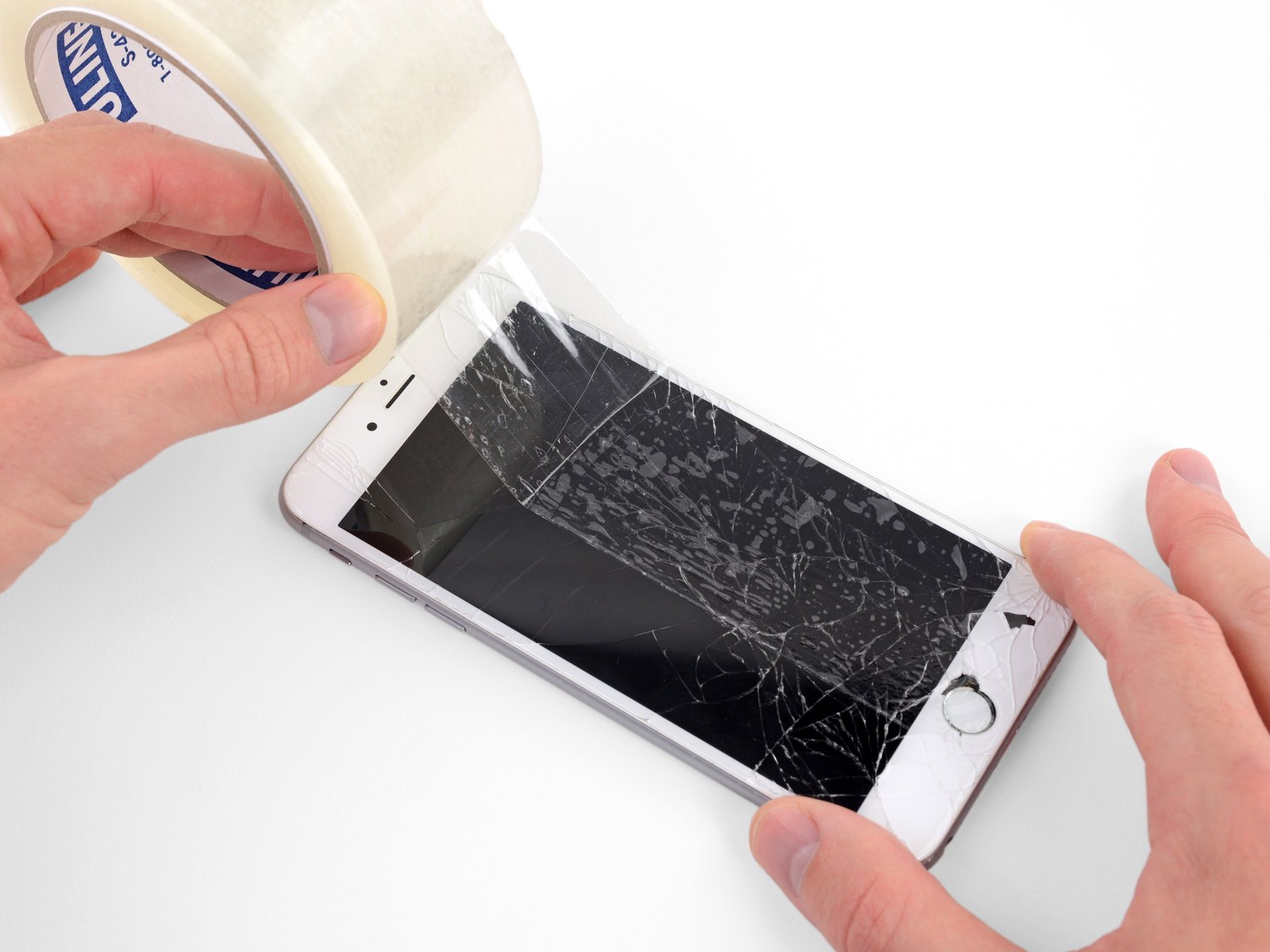
Sometimes, though, the glass will be damaged to the point of posing an injury risk for your fingers. If that’s the case, you can take some clear packaging tape andstick a layer on top of the screento smooth down any jagged edges that could potentially slice your finger open. This is something you’ll want to do anyway when it comes time to replace the screen, depending on where the bulk of the damage is.
If the screen won’t register touch input, or your home button stopped working because of the drop, things get tougher. Thereisan iOS feature that lets yousimulate the home button on the screen, but that only works if touch function is working.
If touch isn’t working at all (or is only partially working), there are ahandful of things you can doto make the phone usable. Siri can perform a number of actions using just your voice, and you can tell her to turn onVoiceOverto hear a description of what’s happening on-screen. You can also plug in a USB keyboard withan adapter, which will at least allow you to enter your passcode and get important information backed up through iTunes.
How to Protect Your Newly-Replaced Screen
Shattering your screen is a wake-up call: it’s time to start protecting your phone. If you haven’t already, you should probably invest in a good case and screen protector.
A good case not only protects the phone from incurring dings, scuffs, and scratches around the body of the device (upping its resale value later on), but it can also absorb a lot of the shock that comes from dropping a phone onto a hard slab of concrete. Plus, a lot of cases have a small lip that extends past the surface of the phone, so even if your device landed flat on its face, the case’s lip edge would prevent the screen from making contact with concrete. And it’s one feature that you should absolutely have with whatever case you decide to go with.
Obviously, there are hundreds, if not thousands, of cases available on the market. If you want something that looks really great, I personally am a fan ofApple’s leather casesand have used them for years (and through plenty of accidental drops). There are lots of other great cases out there, too, from companies likeSilk,tech21,Spigen, andSpeck.
If you’re looking for the ultimate protection,OtterBoxis known for having some of the toughest cases around, with lots of different styles and levels of protection to choose from. They may not be the cheapest, mind you, but they’re still much cheaper than a repair would cost further down the line.
A case can protect your screen from a lot of falls, but not all of them—if your screen takes a direct hit, it’s still in jeopardy. That’s where screen protectors can save the day, especiallytempered glass options. While they’re really just meant to protect the screen from scratches and general wear and tear, I’ve seen first-hand the impact (no pun intended) that tempered glass screen protectors can make on a dropped phone—the screen protector will often crack while leaving your phone’s actual screen unscathed.
Of course, I wouldn’t rely on just a screen protector to save your phone from a drop, so your best bet is to pull double duty and get both a case and a screen protector for your iPhone. I’ve had both installed on all my iPhones since day one, and even after many accidental drops on concrete, I’ve never dealt with a broken screen.












.jpg)
